Small apps that quietly keep your life in order — right on your phone.
Five simple planners for pets, family health, money, kids, and big-ticket plans. They work offline, live on your home screen, and keep your information on your device. No app store, no account, no subscription — pay once.
It sounds too simple, so here it is, start to finish. Four steps, about two minutes.
1
Buy it
Tap a buy button and you go straight to a checkout — no second product page to read. Your download link arrives right away, no waiting on shipping.
2
Open the link on your phone
Tap the file or link and the app opens in your phone's browser. Nothing to install, nothing to sign up for.
3
Add to Home Screen
Use your browser's share menu, then Add to Home Screen. Now it has its own icon and opens full screen, exactly like a normal app.
4
Use it offline, forever
Your data is saved on the device. No signal needed, no account, no monthly fee — it just keeps working.
The five apps
Each one does a single job well. Try any demo free before you buy — no email required — and every purchase is covered by a 30-day money-back guarantee.
For pet owners who want every vet detail in one place.
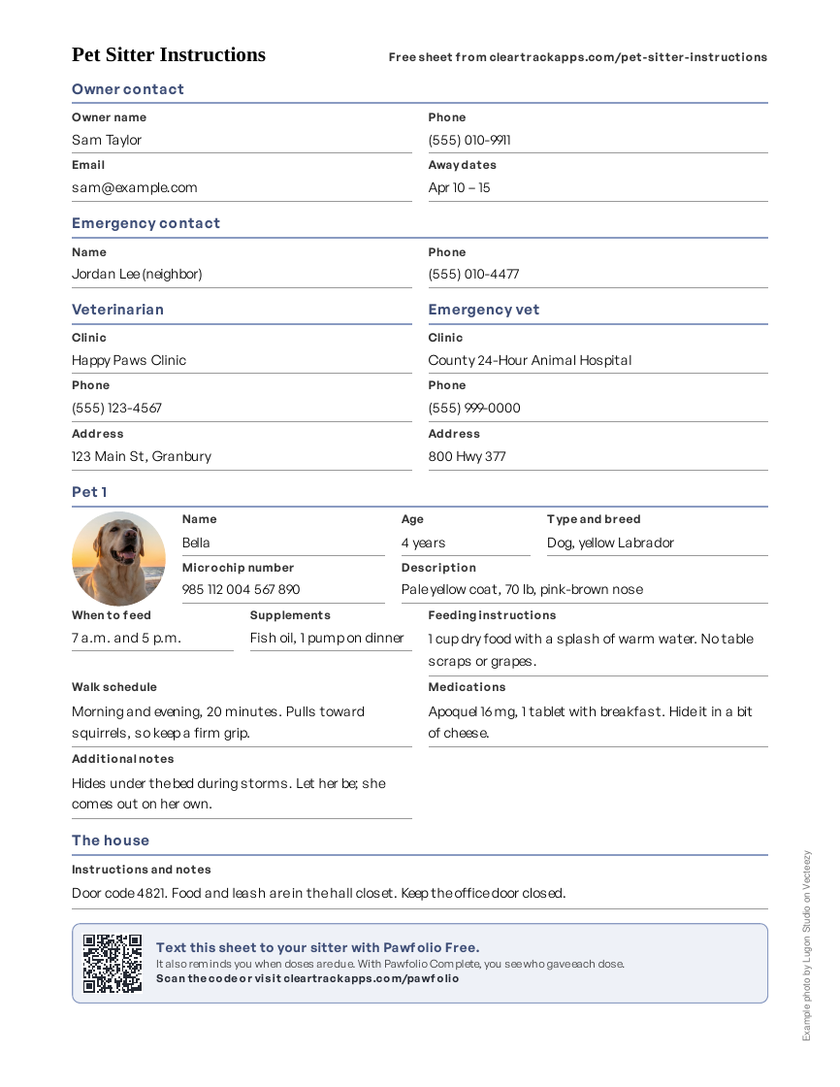
Pawfolio keeps your pet's whole life on your phone — vet visits, medications, vaccine dates, weight, and receipts. Add as many pets as you like, from one dog to a full household of animals. When you travel, hand the sitter a printable sheet with tap-to-call vet numbers instead of a rushed text thread.
Vet visits, medications & supplements, and vaccination due dates
Weight tracking and expense history for each pet
Document vault for records, receipts, and adoption papers
Shareable, printable pet-sitter sheet with tap-to-call vet numbers
For families and caregivers juggling more than one person's health.
Most apps that do this bill you every year, forever — and most of them show ads. This one is $24.99 once, with no ads and no renewals. It keeps what a doctor's office asks for in one private place on your phone: medications and doses, appointment notes, vitals, and pharmacy details. Track up to six family members, each with their own records, and print a clean summary for the next visit.
Doctors, pharmacies, and emergency contacts in one list
Medications with doses plus phone reminders
Appointments with visit notes you write afterwards
Vitals history — blood pressure, weight, glucose, and more
Up to 6 family members, with printable records for any visit
Pay once, not every year
Similar apps$30–$70 every year
This app$24.99 once
Typical yearly plans for comparable medication and health-record apps, checked August 2026. Most of them show ads. This one has none, and you never need a renewal.
For anyone who wants a budget that stays on their own phone.
A full personal budget without a bank login or a monthly fee. Log income, bills, and spending by category, then watch savings goals and debt payoff move month to month. Already have statements? Import a CSV or OFX file from your bank instead of typing everything in.
For parents teaching kids to earn, save, and give.
Kids do chores, earn money, and split it between Save, Spend, and Give jars. The thing they're saving for sits behind a hidden photo that reveals itself piece by piece as the jar fills, which is what keeps them checking in. Parents get a PIN-protected dashboard, and phones can sync between parent and child.
For anyone planning a procedure and saving up for it.
Plan the whole thing before you book: estimate the real cost, compare physicians, and save toward the total week by week. Twelve sections cover deposits, payments, travel, recovery notes, and a private photo log. It stays on your phone, so nothing about it lives in someone else's account.
Cost estimator covering surgeon, facility, and extras
Savings tracker with weekly streaks
Physician selection notes and comparisons
Travel and recovery planning
Receipts and a private photo log across 12 sections
Prices are one-time, and every app is covered by a 30-day money-back guarantee. Pawfolio, Medical Records Keeper, and Puzzle Pig are also available on Etsy at Etsy's own pricing.
Questions people ask first
Is this an app from the App Store or Google Play?
No — and that's on purpose. You get a link (or a file) that opens in your phone's browser. Tap Add to Home Screen and it sits next to your other apps with its own icon, opens full screen, and works with no signal.
Do I need to create an account or sign in?
No account, no password, no email verification. Open it and start using it.
Does my data leave my device?
No. Everything you type stays on the device you typed it on. There is no server to send it to, no cloud sync, and no analytics collecting what you enter. That's why these apps work on a plane or in a basement with no signal.
Does it work on iPhone and Android?
Yes — both, plus tablets and computers. Anything with a modern browser (Safari, Chrome, Edge, Firefox) works.
Is there a subscription?
Never. You pay once and it's yours to keep. No renewals, no upgrade nags, no price creep. Apps that do similar jobs are usually subscriptions running roughly $30–$70 a year — every year, for as long as you use them.
What if I buy it and it isn't right for me?
Email cleartrackapps@gmail.com within 30 days and you get your money back in full. No forms, no questions, no explanation needed. You can also try any app free before you buy — every one has a full demo with no email required.
Can I get help if I get stuck?
Yes. Email cleartrackapps@gmail.com and Shauna will help you get set up. Every purchase also includes a short getting-started guide.