

Free printable medication tracker
A weekly medication log for you, your kids or an aging parent. Pick medicines taken every 24, 12, 8, 6 or 4 hours, then print. Write the time each dose is due and the time it was actually taken.
Build your chart
Choose how many medicines are taken on each schedule. The chart below changes as you go.
Add names and times (optional)▾
If you set a first dose time, the rest of the day's Due times are filled in for you. Or leave it blank and write them in.
Prints landscape on US letter paper. What you type stays in this browser.
Or download the ready-made chart
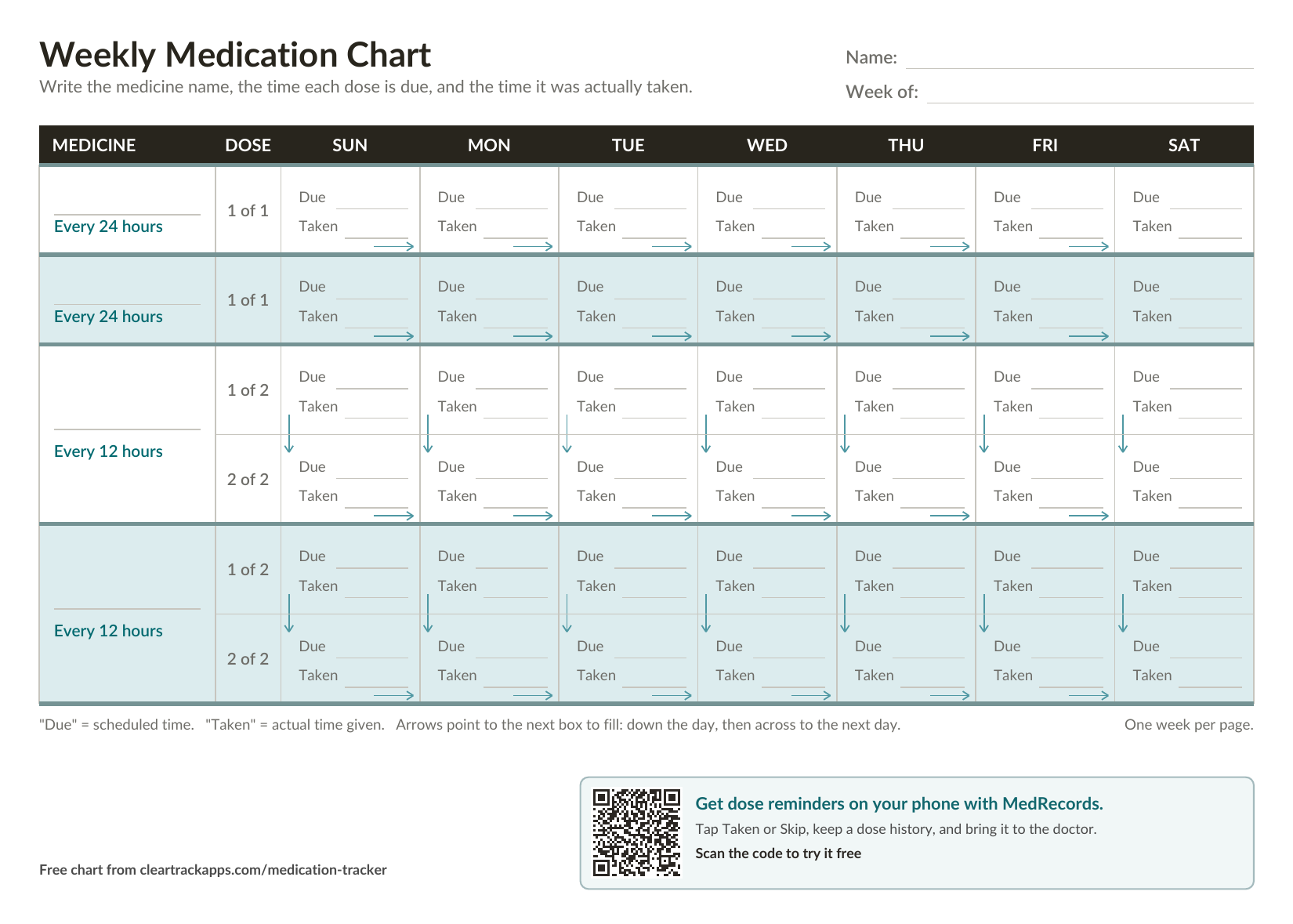
Two once-a-day sections and two every-12-hours sections, Sunday through Saturday.
Rather have your phone remind you?
MedRecords reminds you when each dose is due. Tap Taken or Skip, and for every-few-hours medicines it counts the next dose from when it was really taken. No account.
Try MedRecords free →Free. No signup, no email.
How to use the chart
- Write the medicine and dose in the left column. One medicine per section, for example “Amoxicillin 500 mg, 1 capsule.”
- Each medicine gets a section for its schedule. Once a day gets one box per day. Every 12 hours gets two (1 of 2 and 2 of 2), every 8 hours three, every 6 hours four, and every 4 hours six.
- Fill in “Due” with the time the dose is scheduled. Each dose is due that many hours after the one before. In the builder, set the first dose of the day and the rest are filled in for you.
- Fill in “Taken” with the time it was actually given. If it was late, the gap is right there on the page, and you can count the next dose from when it was really taken.
- Follow the arrows. They point to the next box: down the day, then across to the next day.
Tips for keeping doses on schedule
- Write the time, not a checkmark. A checkmark tells you a dose happened. A time tells you when the next one is due.
- Keep the chart where the medicine is. Taped inside the cabinet door or on the fridge, so nobody has to remember to go find it.
- Everyone writes on the same sheet. When two people help with someone's medicines, one chart is how you avoid a missed dose or a double dose.
- Caring for a parent or a sick child? Fill in the Due times for the week, and ask whoever gives a dose to write the Taken time.
- Bring it to the doctor. A week of real dose times answers “Are you taking it on schedule?” better than memory does.
- Ask about missed doses ahead of time. Whether to take a late dose or skip it depends on the medicine. Ask your doctor or pharmacist, and write their answer on the chart.
Want reminders instead of paper?
MedRecords keeps each family member's medications, with a phone reminder when a dose or a refill is due. Tap Taken or Skip, see the dose history, and print a medication list for the doctor. Appointments, doctors, pharmacies and records live there too. No account, and your records stay on your device.
Questions
Is this really free?▾
Yes. No signup and no email. Download it, print it, and you're done.
Which version should I download?▾
The printable PDF if you'll write on it by hand. The fillable PDF if you'd rather type the medicine names and times first. The spreadsheet if you want to add rows or change the layout.
Can I use it for more than one person?▾
Yes. Use the Name line at the top and print one sheet per person, so nobody's doses get mixed up.
Can I make a chart for every-8-hours, every-6-hours or every-4-hours medicines?▾
Yes. Use Build your chart at the top of the page and choose how many medicines are on each schedule. The chart changes as you go, and Print gives you exactly what you see.
What if there are a lot of medicines?▾
The builder takes up to six on each schedule. A page holds up to 9 dose rows. Past that, the chart goes onto a second page, so the boxes stay big enough to write in.
What size does it print?▾
Landscape, on US letter paper. One page covers a week. If the week starting date is set, each day shows its date.
Is there a version that reminds me?▾
MedRecords reminds you on your phone when each dose is due, lets you tap Taken or Skip, and for every-few-hours medicines counts the next dose from when it was really taken. It also keeps the family's appointments, doctors and records together, and your records stay on your device.